
Download Pastedownload – free online multimedia downloader
Overview
Pastedownload is a cloud‑based download manager that lets you grab videos, images, and audio from the most popular social and video platforms without installing a single program. By simply copying a URL into the web‑app’s central bar, the service reaches out to the original site’s CDN, extracts the media file, and presents you with a range of download options. Whether you need an MP4 for offline viewing, a high‑quality M4A for a podcast, or a lightweight WEBM for quick sharing, Pastedownload instantly generates clean, direct links that avoid trap URLs and intrusive pop‑ups.
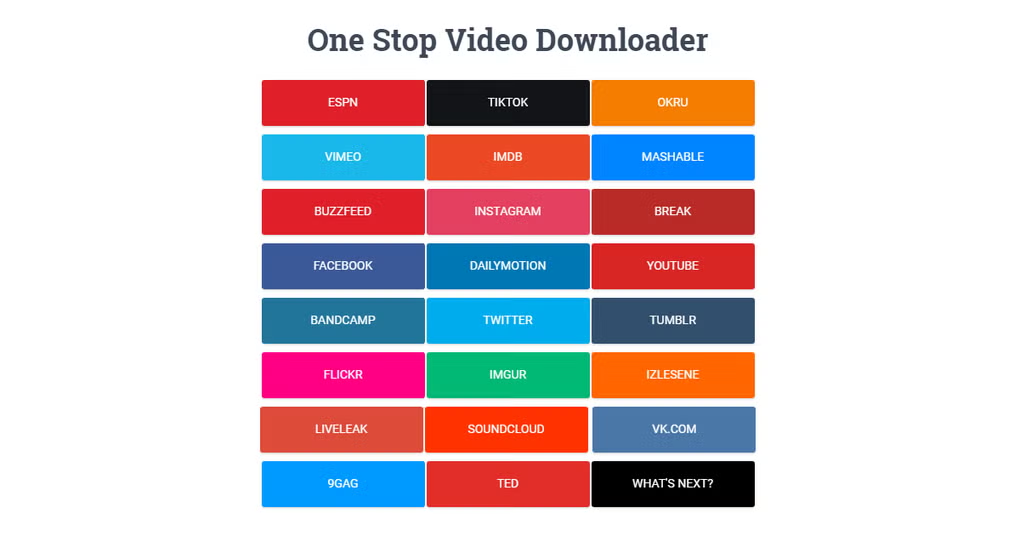
The platform currently supports YouTube, Facebook, Instagram, Twitter, Dailymotion, Vimeo, and many other sites, making it a versatile alternative to traditional desktop tools. Because it runs entirely in the browser, you only need a stable Wi‑Fi or mobile data connection; there is no hidden software, no registration, and no risk of installing malware. The interface is intentionally minimalist: a single input field, a color‑coded button system (green for MP4, violet for audio formats), and status icons that tell you whether a conversion is direct (check‑mark) or slower (exclamation).
This design philosophy keeps the download process fast, transparent, and secure, while the permanent ad banner around the URL bar remains the only visual distraction. In short, Pastedownload delivers a seamless, safe, and free way to store your favorite online media on any device.
Key Features
- Supports major platforms: YouTube, Facebook, Instagram, Twitter, Dailymotion, Vimeo, and more.
- Zero‑install, browser‑based tool – works on Windows, macOS, Android, iOS, and Linux.
- Multiple output formats: MP4, WEBM, M4A, MP3, and image files (JPG, PNG).
- Color‑coded download buttons (green for video, violet for audio) for instant format recognition.
- Direct vs. shared conversion icons to indicate download speed and reliability.
- Resume‑anywhere capability – paused downloads can be continued without data loss.
- Ad‑light experience: no pop‑up windows, only a static banner that does not interrupt the workflow.
- Secure URLs – generated links contain no hidden trackers or malicious redirects.
- Automatic processing – paste the link and the service begins extracting within seconds.
- Free of charge with no hidden subscription fees.
How to Use Pastedownload & Compatibility
Step‑by‑step usage
1. Open your preferred web browser (Chrome, Firefox, Safari, Edge, or any mobile browser).
2. Navigate to the official Pastedownload website.
3.
Locate the large URL input bar at the top of the page.
4. Copy the link of the video, photo, or audio you wish to save and paste it into the bar.
5. As soon as the link is entered, the service contacts the source CDN and begins processing.
6.
Once processing is complete, a list of download options appears. Green buttons indicate MP4 video files; violet buttons represent audio formats such as M4A or MP3.
7. Click the desired button.
If a check‑mark appears, the file will download directly; an exclamation mark signals a slower, shared conversion but still safe.
8. The download starts automatically in your browser’s download manager. If you need to pause, simply cancel and later revisit the same URL to resume.
Device & OS compatibility
Because Pastedownload runs entirely in the cloud, it is compatible with any operating system that can launch a modern web browser. This includes:
- Windows 10, 11 and earlier versions
- macOS Catalina and newer
- Linux distributions with a supported browser
- Android 8.0 (Oreo) and later
- iOS 13 and later (Safari, Chrome, or any third‑party browser)
No additional plugins, extensions, or Java installations are required. The only prerequisite is a reliable internet connection; higher bandwidth yields faster conversion and download times. For users on limited data plans, selecting lower‑resolution video options can conserve bandwidth while still delivering acceptable quality.
Pros, Cons, FAQ & Final Verdict
Pros
- Completely free with no hidden costs.
- No software download or installation required.
- Broad platform support covering the most popular social sites.
- Secure, direct download links that avoid malicious redirects.
- Resume capability for interrupted downloads.
- Minimal ad intrusion compared to competing services.
Cons
- Relies on a stable internet connection; offline use is impossible.
- The static banner ad near the URL bar can be visually distracting.
- High‑traffic periods may cause slight delays in processing.
- Some premium formats (e.g., 4K video) are not always available for free.
Frequently Asked Questions
Is Pastedownload safe to use?
Yes. All generated links are direct, contain no hidden trackers, and are processed through the original site’s CDN, ensuring that the files you receive are authentic and free from malware.
Do I need to create an account?
No. Pastedownload is completely account‑free. Simply paste the URL and start downloading.
Can I download 4K videos?
The free version may limit the highest resolution available. For 4K or premium quality, you might need to use a paid tier or a different service.
What browsers are supported?
All modern browsers are supported, including Chrome, Firefox, Edge, Safari, and Opera on desktop and mobile platforms.
Is there a limit on the number of files I can download?
There is no hard limit, but excessive usage may trigger temporary throttling to preserve service stability.
Final Verdict & Call to Action
For anyone who needs a quick, reliable, and completely free way to save online media, Pastedownload delivers on its promises. Its browser‑only architecture eliminates the security concerns that come with traditional desktop downloaders, while the intuitive UI makes it accessible to users of all skill levels. Although it depends on a constant internet connection and carries a modest banner ad, the overall experience is smooth, secure, and ad‑light compared with many rivals. If you’re looking for a hassle‑free solution to grab videos, music, or images from YouTube, Instagram, Facebook, and beyond, give Pastedownload a try today—no registration, no cost, just pure downloading power.
Start downloading now and enjoy seamless offline access to your favorite content.



.png)



